λORM


Write a query once. Run it on any database, from your code, a terminal, an API or an AI agent.
λORM is a query language and a runtime for your data. You describe your domain once (entities, relations, rules) in a schema and write queries as lambda expressions over it:
Orders
  .filter(p => p.customer.country == country && p.orderDate >= since)
  .include(p => [p.customer.map(c => c.name), p.details.include(d => d.product.map(p => p.name))])
λORM turns that query into SQL for MySQL, MariaDB, PostgreSQL, SQL Server, Oracle and SQLite, or into an aggregation pipeline for MongoDB, even when the entities of one query live in different databases. And the same query runs from a Node.js library, the command line, a REST or WebSocket API, or an AI agent through MCP.
Why λORM
- One domain, any database. Queries talk about
OrdersandCustomers, not about tables, dialects or where each entity is stored. - One query across several databases. Orders in MongoDB, customers in PostgreSQL, products in MySQL: one query, one result. λORM splits it per source and joins the results.
- Stages. The same domain on one SQLite in development and distributed over three engines in production, or a write side and a read side (CQRS), by configuration, not code.
- Every channel. TypeScript (typed), a string, the CLI, REST, WebSocket, MCP: the same language everywhere.
- Governed access. The Data Gateway publishes your schemas with credentials,
permissions (
read,write, …) and an audit of every change, for applications, people and AI agents alike. - Schema-first, both ways. From a YAML to the tables (
push), from the databases to the YAML (pull), or from a JSON file of data to a schema, tables and rows (incorporate).
See the features for a complete list.
The same query, from everywhere
The expression Products.filter(p => p.price > minPrice).map(p => [p.name, p.price]) is the same in every channel.
Node.js / TypeScript
The library, @lambdaorm/lib. See Usage.
import { orm } from '@lambdaorm/lib'

await orm.init('./lambdaORM.yaml')
const products = await orm.execute(
  (minPrice: number) => Products.filter(p => p.price > minPrice).map(p => [p.name, p.price]),
  { minPrice: 50 })
Command line
The lambdaorm command, @lambdaorm/cli. See CLI.
lambdaorm execute -q "Products.filter(p => p.price > minPrice).map(p => [p.name, p.price])" -d '{"minPrice": 50}'
REST API, from any language
The Data Gateway publishes the schema over HTTP. See REST API.
curl -X POST http://gateway:8080/northwind/execute -H "X-Api-Key: $KEY" -H "Content-Type: application/json" \
  -d '{"query": "Products.filter(p => p.price > minPrice).map(p => [p.name, p.price])", "data": {"minPrice": 50}}'
import requests

products = requests.post("http://gateway:8080/northwind/execute", headers={"X-Api-Key": key}, json={
    "query": "Products.filter(p => p.price > minPrice).map(p => [p.name, p.price])",
    "data": {"minPrice": 50},
}).json()
Node.js client
@lambdaorm/client: the interface of the library, run on a Data
Gateway over REST or WebSocket. See Clients and WebSocket API.
import { orm } from '@lambdaorm/client'

await orm.init('ws://gateway:8083/northwind', { headers: { 'X-Api-Key': key } })
const products = await orm.execute('Products.filter(p => p.price > minPrice).map(p => [p.name, p.price])', { minPrice: 50 })
orm.on('schema.statusChanged', ({ status }) => console.log(status))
AI agents
The Data Gateway speaks MCP: an agent explores the domain and queries it with the permissions of its credential, never more.
claude mcp add --transport http northwind http://gateway:8081/northwind/mcp --header "X-Api-Key: $KEY"
"Which products cost more than 50?": the agent reads the domain of the schema from the tools and calls
orm_executewithProducts.filter(p => p.price > 50).map(p => [p.name, p.price]). With areadcredential, it can't change anything.
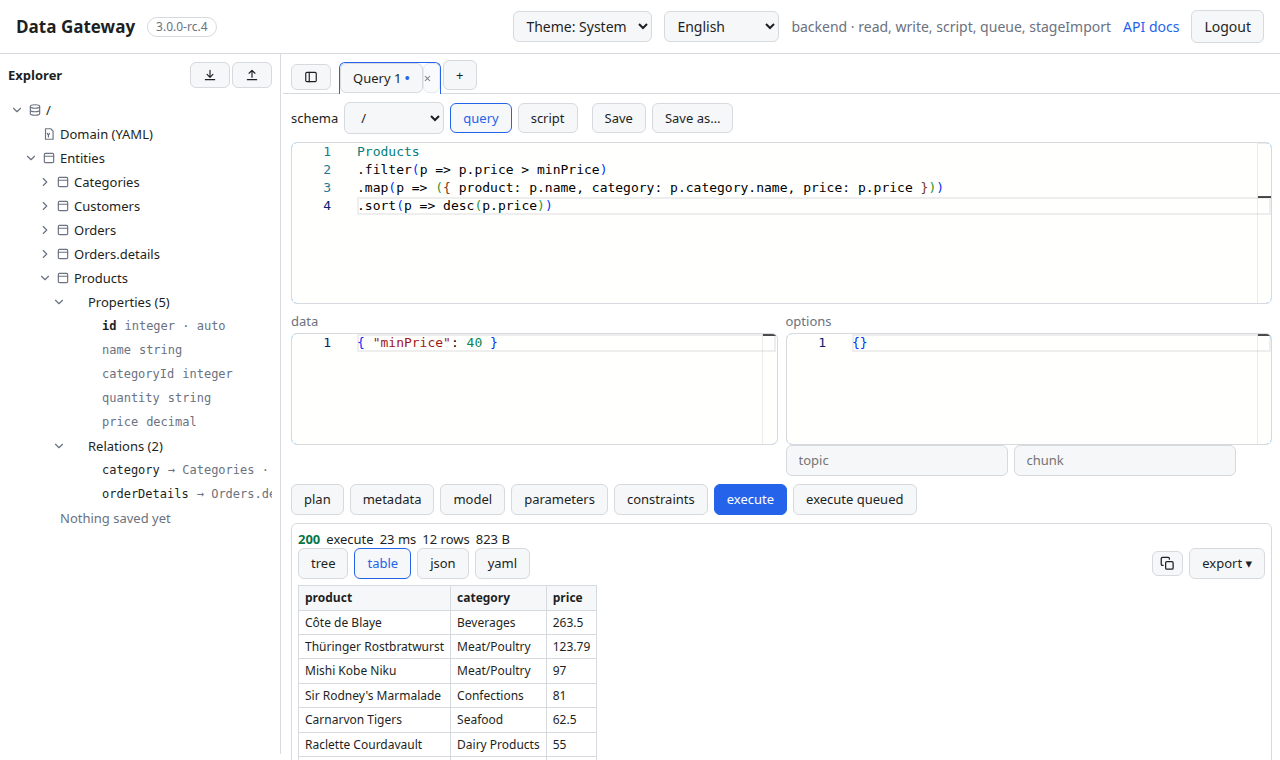
The browser
The IDE of the Data Gateway, built with
@lambdaorm/ui: connect to gateways, browse the schemas, read each entity as a form, write
queries with autocompletion and draw diagrams.
One query, three databases
A stage of the northwind lab keeps the catalog in MySQL, the customers in PostgreSQL and the orders in MongoDB:
stages:
  - name: default
    sources:
      - name: Catalog                                   # MySQL
        condition: entity.in(["Categories","Products"])
      - name: Crm                                       # PostgreSQL
        condition: entity.in(["Address","Customers"])
      - name: Ordering                                  # MongoDB
        condition: entity.in(["Orders","Orders.details"])
The application doesn't know it. It asks for the orders of a customer with the name of the customer and, for each line, the product and its category:
Orders
  .filter(p => p.customerId == customerId)
  .include(p => [
    p.customer.map(c => c.name),
    p.details
      .include(d => d.product.include(pr => pr.category.map(c => c.name)).map(pr => pr.name))
      .map(d => [d.quantity, d.unitPrice])
  ])
and orm.plan shows what λORM will run (abridged):
Orders            MongoDB     Ordering   aggregate [{ $match: { CustomerID: … } }, { $project: … }]
├─ Customers      PostgreSQL  Crm        SELECT c.CompanyName AS "name", … FROM Customers c WHERE c.CustomerID IN ($1)
└─ Orders.details MongoDB     Ordering   aggregate [{ $unwind: … }, { $match: { OrderID: { $in: … } } }, …]
   └─ Products    MySQL       Catalog    SELECT p.ProductName AS name, … FROM Products p WHERE p.ProductID IN (?)
      └─ Categories MySQL     Catalog    SELECT c1.CategoryName AS name, … FROM Categories c1 WHERE c1.CategoryID IN (?)
One query per relation, never one per row: each level reads the keys of the level above with an IN. When there
are many, the keys are split into chunks (at most 999 on Oracle, 7000 on the others) that run in parallel. The
result is one JSON tree, as if everything were in one database. See include.
One query, each engine's dialect
Products
  .filter(p => p.price > minPrice && p.category.name == category)
  .map(p => ({ name: p.name, price: p.price }))
  .sort(p => desc(p.price))
  .page(1, 10)
-- MySQL
SELECT p.ProductName AS name, p.UnitPrice AS price FROM Products p INNER JOIN Categories c ON c.CategoryID = p.CategoryID
WHERE (p.UnitPrice > ? AND c.CategoryName = ?) ORDER BY p.UnitPrice desc LIMIT 0,10

-- PostgreSQL
SELECT p.ProductName AS "name", p.UnitPrice AS "price" FROM Products p INNER JOIN Categories c ON c.CategoryID = p.CategoryID
WHERE (p.UnitPrice > $1 AND c.CategoryName = $2) ORDER BY p.UnitPrice desc OFFSET 0 LIMIT 10

-- SQL Server
SELECT p.ProductName AS name, p.UnitPrice AS price FROM Products p INNER JOIN Categories c ON c.CategoryID = p.CategoryID
WHERE (p.UnitPrice > @minPrice AND c.CategoryName = @category) ORDER BY p.UnitPrice desc OFFSET 0 ROWS FETCH NEXT 10 ROWS ONLY

-- Oracle
SELECT p.ProductName AS "name", p.UnitPrice AS "price" FROM Products p INNER JOIN Categories c ON c.CategoryID = p.CategoryID
WHERE (p.UnitPrice > :minPrice AND c.CategoryName = :category) ORDER BY p.UnitPrice desc OFFSET 0 ROWS FETCH NEXT 10 ROWS ONLY
The join is implicit (p.category.name), the parameters are always bound, and the property names are the domain's
(price), not the columns' (UnitPrice): the mapping lives in the schema. See the
engines and the query language.
Stages: the same code, another infrastructure
infrastructure:
  stages:
    - name: dev                  # everything in one database
      sources: [ { name: Local } ]
    - name: prod                 # the same domain, spread over three engines
      sources:
        - { name: Catalog,  condition: 'entity.in(["Categories","Products"])' }
        - { name: Crm,      condition: 'entity.in(["Address","Customers"])' }
        - { name: Ordering, condition: 'entity.in(["Orders","Orders.details"])' }
await orm.execute(query, data, { stage: 'prod' })
A write stage and a read stage over different databases is CQRS by configuration.
Governed access: the Data Gateway
The Data Gateway (Docker flaviorita/data-gateway)
publishes one or several schemas over REST, WebSocket and MCP, with a web UI, with no backend to write:
authentication:
  adapter: local
  type: apikey
  keys:
    - { name: agent,   value: $AGENT_KEY,   permissions: [ read ] }
    - { name: backend, value: $BACKEND_KEY, permissions: [ read, write, script ] }
transports:
  http:       { port: 8080 }    # REST, OpenAPI
  mcpHttp:    { port: 8081 }    # AI agents
  management: { port: 9090 }    # the IDE (internal network only; left out in production)
- The same permissions on every transport: an agent with
readcan query, never write. - Every write leaves an audit line: who, what, which entities, how many rows.
- Each schema in its own worker; Prometheus metrics, health probes for Kubernetes, rate and size limits.
Try it in ten minutes: Getting started, from an empty folder to the REST API, the IDE, MCP and WebSocket.
The ecosystem
| Project | Published as | What it is |
|---|---|---|
| Library | @lambdaorm/lib |
the ORM: runs the queries against the databases |
| CLI | @lambdaorm/cli |
the lambdaorm command: projects, synchronization, import / export, queries, scripts |
| Data Gateway | Docker flaviorita/data-gateway |
the schemas over REST, MCP and WebSocket |
| Data Gateway IDE | Docker flaviorita/data-gateway-ide · desktop: Linux, Windows, macOS |
the IDE of the gateways: connections, explorer, queries, diagrams, administration |
| Node.js client | @lambdaorm/client |
the interface of the library, run on a Data Gateway |
| UI components | @lambdaorm/ui |
React components: the query editor, results, explorer and diagrams |
| 3xpr | 3xpr |
the expression engine the queries, scripts and schema rules are built on |
The source is in github.com/lambda-orm/core.
Note
The unscoped packages lambdaorm, lambdaorm-cli and lambdaorm-client-node are no longer maintained: use the
@lambdaorm/* packages.
Get started
| I want to… | Start here |
|---|---|
| query my databases from Node.js / TypeScript | Usage |
| create a project, sync the databases, import data | CLI |
| give applications in any language, or AI agents, access to my data | Data Gateway: getting started |
| learn the query language | Query language |
| define the domain, the sources and the stages | Schema |
| see complete examples | Labs |
Learn more
- Queries: query language | select | join | grouping | include | insert | bulk insert | update | delete | metadata | operators and functions
- Schema: schema | definition | expressions | environment variables | composite | listeners | multiple stages | multiple sources | engines
- Synchronization: overview | push | pull | fetch | introspect | incorporate
- Usage: usage | repository | transactions | scripts
Community
Questions, ideas and feedback are welcome in GitHub Discussions and on Discord; issues and pull requests in github.com/lambda-orm/core.