Data Gateway
Objective
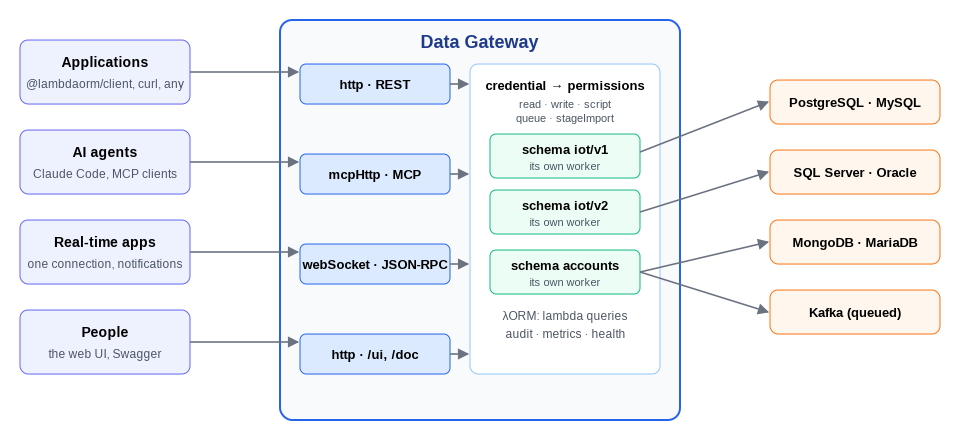
Give applications, AI agents and people governed access to the data of λORM schemas over the network, by configuration, without writing a backend for it.
A λORM schema already describes a domain (its entities, relations and rules) and where its data lives (one or many databases of different engines). The Data Gateway publishes that schema so that:
- an application queries and writes it through a REST API (or a WebSocket connection), with the same lambda queries it would use in Node;
- an AI agent explores the domain and queries it through MCP, knowing the entities and the language;
- a person explores the schemas, reads each entity as a form, tries queries and draws diagrams in its IDE;
and so that who can do what is decided in one place, the same for all of them: each credential has permissions, and every change is audited.
Scope
What it does:
- Serves one or several λORM schemas per instance, each at a route (
/iot/v1,/iot/v2,/accounts). - Exposes them by four transports, each one only when it has a port: REST (
http), MCP (mcpHttp,mcpWebSocket) and a JSON-RPC API over WebSocket (webSocket). - Every operation of λORM: queries (
execute,plan,metadata,model,parameters,constraints), scripts (several queries in one transaction), queued executions (Kafka), the schema and its model, and stages (export, import). - Authentication (API key, bearer token, basic) and permissions per credential (
read,write,script,queue,stageImport), globally, per transport or per schema. - Isolation: each schema runs in its own worker, with its own environment and connections; one that fails doesn't affect the others.
- Audit of writes, metrics (Prometheus), health (Kubernetes probes), limits (rate, concurrency, sizes, time).
- An IDE (its own image, reaching the gateway's
managementport): explorer, entity forms, query tabs with autocompletion, saved queries and diagrams of the domain.
What it doesn't do:
- It doesn't define the domain nor migrate the databases: that is the schema and the
CLI (
push,pull, …). - It doesn't accept SQL: only λORM queries, translated for each source.
- No users nor roles of its own beyond the credentials of its configuration (no login against an identity provider yet).
- Without the
workbenchWritepermission, the IDE keeps what is saved in each browser.
Description
The Data Gateway is a Node application published as the Docker image
flaviorita/data-gateway. It reads one configuration file
(data-gateway.config.yaml) that says where the schemas are, how they are exposed and who can use them; the schemas
themselves stay in their λORM workspaces (lambdaORM.yaml).
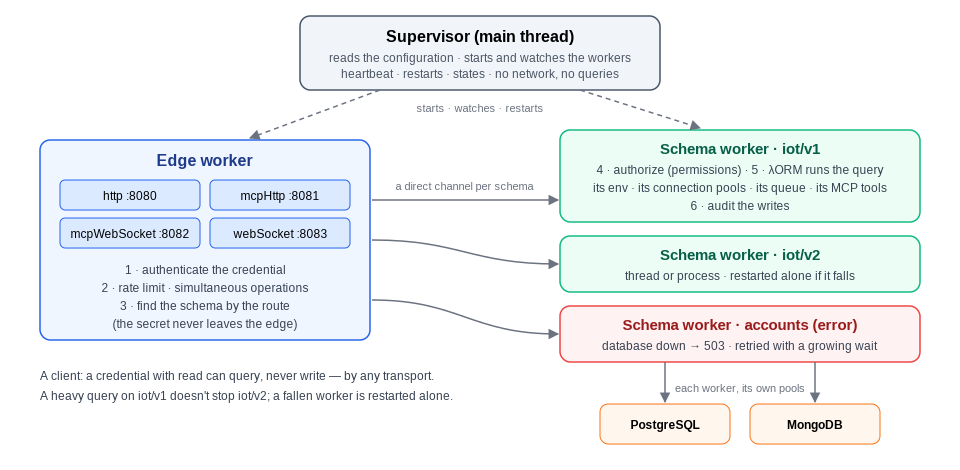
Inside, a supervisor starts and watches the workers. The edge worker listens on the ports of the transports,
authenticates each request and sends it, by a direct channel, to the worker of the schema, which checks the
permissions, runs the operation with λORM against its databases and audits it. A heavy query in one schema doesn't
slow down another; a schema whose database is down answers 503 and is retried, while the others keep working.
Concepts
| Concept | What it is |
|---|---|
| Schema | a λORM workspace (a folder with lambdaORM.yaml): domain, sources, mappings, stages; served at a route |
| Route | where a schema is reached: /iot/v1/execute, /iot/v1/mcp, ws://host/iot/v1; a single schema can be at the root |
| Transport | a way in, on its own port: http, mcpHttp, mcpWebSocket, webSocket |
| Credential | a key, token or user with a name and permissions; sent by the client in each request |
| Permission | read, write, script, queue, stageImport: what the credential can do, on every transport |
| Stage | a λORM scenario of a schema (which sources hold which entities); chosen with options.stage |
| Worker | where a schema runs: a thread or a process of its own |
A request, step by step
- A client sends
POST /iot/v1/executewithX-Api-Key: …and{ "query": "Orders.filter(…)", "data": {…} }. - The
httptransport finds the credential (agent, permissions[read]) and the schemaiot/v1. - The schema's worker analyses the query: it only selects, so
readis enough. - λORM translates it for each source of the stage, runs it and joins the results.
- The answer goes back as JSON. Had it written data, the credential would have needed
write, and the operation would have left an audit line.
In this section
- Getting started: step by step, from an empty folder to the REST API, the IDE, MCP and WebSocket.
- Configuration: the configuration file, schemas, environment, runtime and every key.
- Transports: the five transports (four of data and
management, the IDE's), their routes and options. - REST API: every method of the
httptransport, with examples. - MCP: the tools, resources and transports for AI agents.
- WebSocket API: the JSON-RPC methods and the notifications.
- Security: authentication, permissions, audit, limits and errors.
- UI: the IDE: connections, explorer, entity forms, queries, saved queries and diagrams.
- Clients:
@lambdaorm/client, the CLI and the OpenAPI document. - Operations: Docker, Kubernetes, health, metrics and logs.
- Change log