Explorer
On the left, the connections and the schemas of each one: their metadata, their domain and what is saved in them. Everything opens in a tab on the right.
Its tree
Connections                          + New connection
└─ northwind  http://localhost:9090  ✎ Edit the connection · 🗑 Remove
   Schemas                           New schema · Export · Import
   └─ northwind                      its tab: commands and about
      ├─ Metadata
      │  ├─ config                   the lambdaORM.yaml                 (schemaRead)
      │  ├─ domain                   the domain as YAML, read only
      │  │  ├─ Entities              filter · each entity: Properties, Relations
      │  │  └─ Enums
      │  ├─ application              its start tasks and listeners       (schemaRead)
      │  ├─ infrastructure           Mappings · Sources · Stages · Variables (.env)  (schemaRead)
      │  ├─ data                     the files of data/                  (schemaRead)
      │  └─ src                      the files of the model              (schemaRead)
      └─ projects                    folders, queries and diagrams
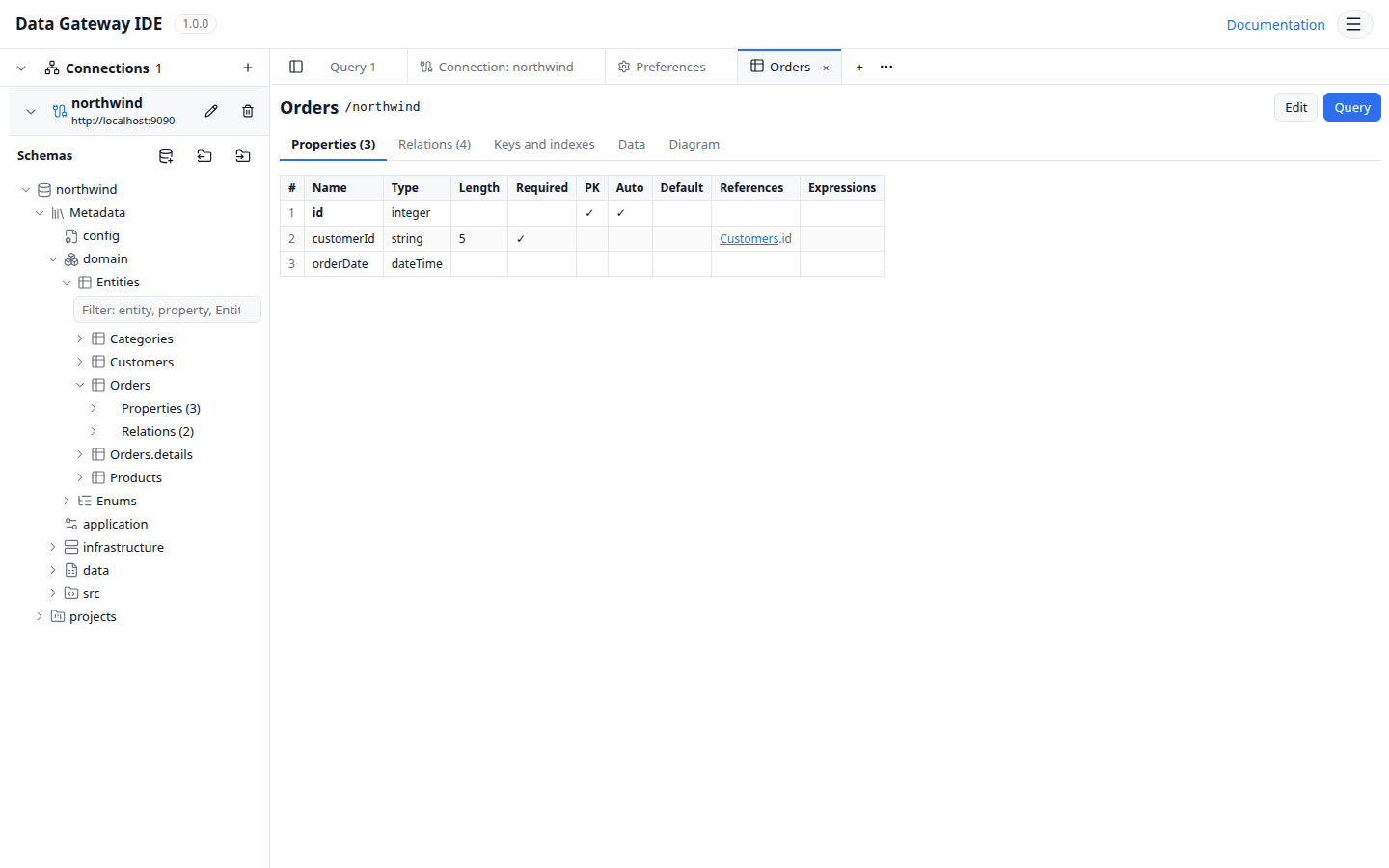
What needs a permission doesn't show without it: with only read, a schema has its domain and its projects.
| Row | A click | Its buttons |
|---|---|---|
| a schema | unfolds it and opens its tab (Administration) | 🗑 remove it (schemaAdmin) |
| domain | unfolds it; a double click opens the domain as YAML (only the domain: never the sources, the connections or the rest of the configuration) | |
| an entity | unfolds it and opens its form | ✎ edit it (schemaWrite), ↗ open it |
| a relation of an entity | opens the entity it reaches (customer → Customers · N — 1) |
|
| config, an element of infrastructure | opens it (Administration) | |
| a folder, a query, a diagram | opens it (Projects) | ✎ edit, 🗑 delete, + in a folder |
A schema that didn't start shows muted, with its state and its reason (or The gateway gives no reason: see its log);
one whose new version didn't start shows ⚠ while the previous one serves.
The filter of the entities
The box over the entities (Filter: entity, property, Entity.field) keeps those whose name, or the name of one of their
properties or relations, has the text: 21 of 192, or Nothing matches. The properties and relations that matched
show under their entity, even folded. Orders.customer looks for the relation customer of Orders. Escape clears
it.
Keyboard
| Key | Does |
|---|---|
| Tab | moves between rows |
| → / ← | unfolds / folds |
| Enter | opens the row (or unfolds it) |
Its width
Drag its edge to resize it (between 180 and 720 px); a double click on the edge fits it to the names. From the keyboard, on the edge: ← and → change it by 20 px (with Shift, 60), Enter fits it. The button ◫ at the left of the tabs hides and shows it. The width is remembered.
The tabs
| Tab | Opened from | Title |
|---|---|---|
| a query | + of the tabs, Query of an entity, a saved query | Query 1, the entity, the name of the saved query |
| an entity | a row of an entity | its name |
| a diagram | a saved diagram | its name |
| the domain | double click on domain | Domain (YAML) schema |
| a schema, its YAML, an element | the administration rows | Schema northwind, lambdaORM.yaml northwind… |
| a connection, preferences, tools | the connection, the menu ☰ | Connection: northwind, Preferences, REST API · northwind… |
- + opens a query tab on the active connection; × closes a tab; up to 20 tabs.
- A right click on a tab, or ⋯: Close, Close others, Close all.
- A • after the title marks changes not saved.
- With several connections, the title says which one:
Orders · production.
Where it was. The open tabs (with the text of each query as it was typed, and the diagrams not saved yet), the active one and what was unfolded in the explorer are kept in the browser: a reload, or the next day, starts where it was.